 Klavia
An app that shows note names on sheet music.
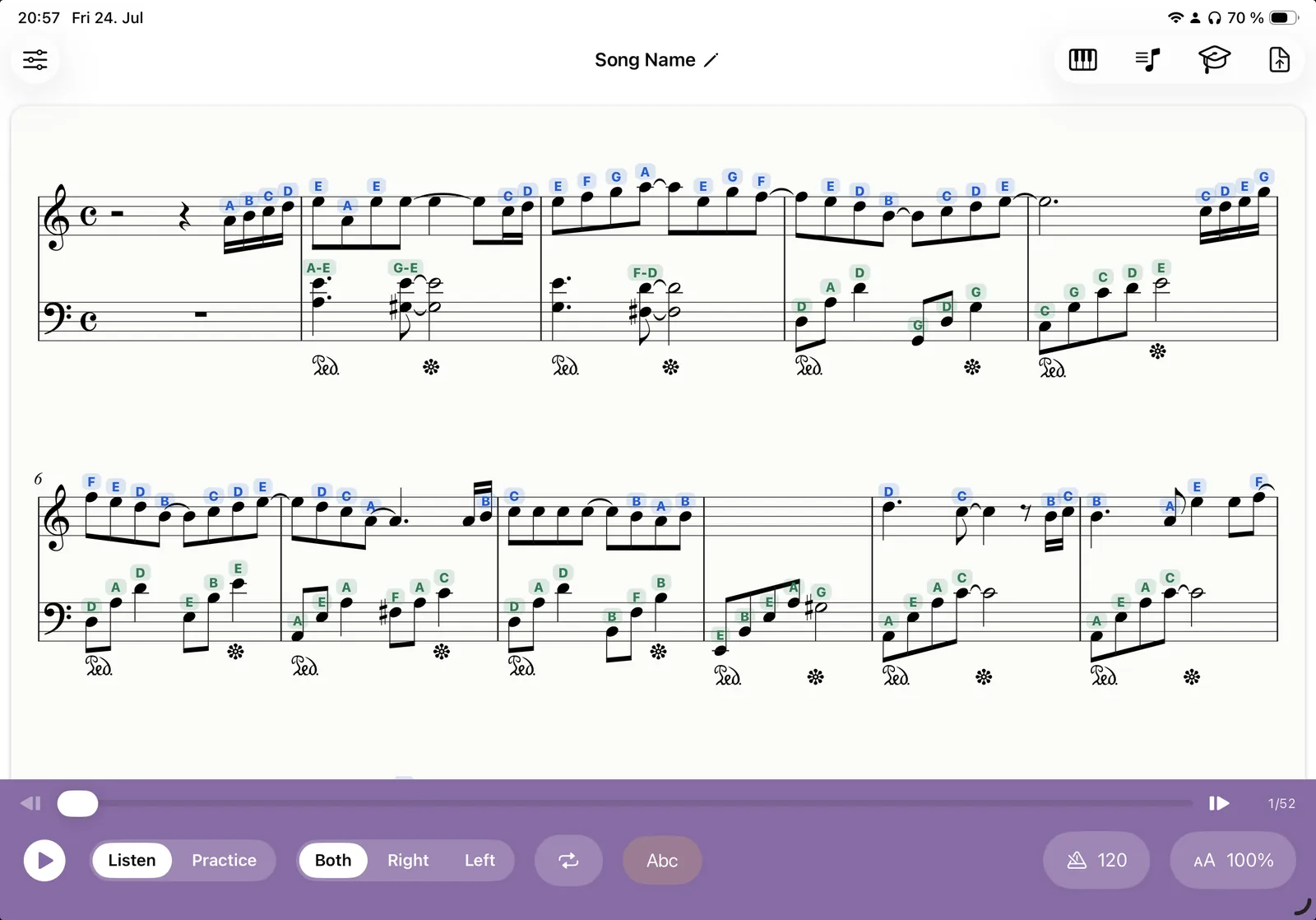
Looking for an app that shows note names on sheet music? Klavia prints the name of every note directly above the note head (C-D-E-F-G for letter-name readers, Do-Re-Mi for solfège) on the scores you import yourself, not on a fixed catalog of beginner arrangements.
The labels are colour-coded by hand, blue for the right and green for the left, and they switch off with one tap when you are ready to read without them.
What the labels actually look like
Note names sit above the note heads on the engraved score itself, not in a separate panel you have to glance away at. Everything stays where your eyes already are.
- Letter names or solfège. C-D-E-F-G-A-B if that is how you were taught, Do-Re-Mi if you learned in a fixed-do or movable-do tradition.
- Colour-coded by hand. Blue for the right hand, green for the left. These are the same colours used throughout the app, so hand assignment reads at a glance.
- One tap off. Labels are a mode, not a permanent alteration of the score. Turn them on for a new piece, turn them off when you no longer need them.
- Alongside fingering. Smart fingering adds finger numbers 1 to 5 above the notes as well, so you can have "which note" and "which finger" at the same time, or either on its own.
Why labels help, and when they should stop
There is an old worry among teachers that writing note names on music stops students learning to read. That worry is fair, and it is worth being honest about.
What labels are genuinely good for is the moment of first contact with a piece. When you are decoding pitch, rhythm, fingering and hand position all at once, removing one of those four lets you work on the other three. That is the same reason you slow the tempo down. You are not making the piece easier forever, you are making this practice session possible.
What labels are bad for is becoming permanent. If you are still reading the letters instead of the note positions after a fortnight on the same piece, the labels have stopped helping and started substituting.
A practical way to stop needing them
- First read-through: labels on. Play slowly, hands separately, and get the notes right without stopping to work out pitches.
- Second session: labels on, faster. You will notice you are looking at them less.
- Third session: labels off, tempo down. Go back to a slow tempo when you take the crutch away, change one thing at a time.
- Stuck bars only: labels back on. Turn them on for the awkward passage, off for the rest.
- Final run: labels off, full tempo. Reading the plain score at speed is the actual skill.
Two or three pieces of that cycle and most people stop reaching for the toggle. Which is the point.
On your own sheet music, not a fixed catalog
Plenty of beginner apps show note names, on their own arrangements, in their own library. That is fine until your teacher hands you a piece, or you want to work on the exam repertoire you already bought, or you find a public-domain score you like.
Klavia labels whatever you import. Bring in a PDF and Optical Music Recognition turns it into real notation; bring in a MusicXML file and the notes are exact from the start. Either way, the labels go on the music actually in front of you.
And because Klavia knows the pitches rather than just showing a picture, the same information powers everything else: playback with a cursor, hands-separately practice, falling notes, loops, tempo, and wait-mode play-along.
Questions
Can I choose between C-D-E and Do-Re-Mi? ▾
Do the labels change my original file? ▾
Will note names stop me learning to read music? ▾
Does it label both hands? ▾
Does it work on any sheet music? ▾
Try it on a piece you are learning
Download Klavia from the App Store and put note names on the score in front of you.
Download on the App Store iPhone and iPad, iOS 16 or later. Android is planned after the iOS release.