 Klavia
An app to play my own sheet music.
“I just want an app to play my own sheet music.” It is one of the most common things piano learners search for, and one of the hardest to satisfy, because almost every piano app is built around its own licensed song library, and the piece in your hands is never in it.
Klavia works the other way round. You bring the score; the app supplies the practice tools.
Why this is surprisingly hard to find
The economics explain most of it. Licensing popular songs is expensive, so an app that has paid for a catalog has every reason to keep you inside it: the catalog is the product, and the practice features exist to sell it.
That model works if the songs you want to play happen to be in there. It falls apart the moment your teacher hands you a photocopy, or you are working through a graded exam book, or you want the Chopin edition you actually own rather than a simplified arrangement of it.
What you need is the reverse: practice tools with no opinion about which music you feed them.
How Klavia plays the music you already have
- Import. A PDF, one page or a whole document, or a MusicXML file straight from your notation software.
- It becomes real notation. PDFs go through Optical Music Recognition; MusicXML is already exact. Either way you get clean engraved notation that reflows and zooms, not a scan.
- Press play. The piece is performed with a cursor following every note and the page scrolling itself.
- Then practise it. Hands separately, tempo from 100% of the score's own marking down to a crawl, metronome, count-in, bar loops, note names, fingering, falling notes, wait mode.
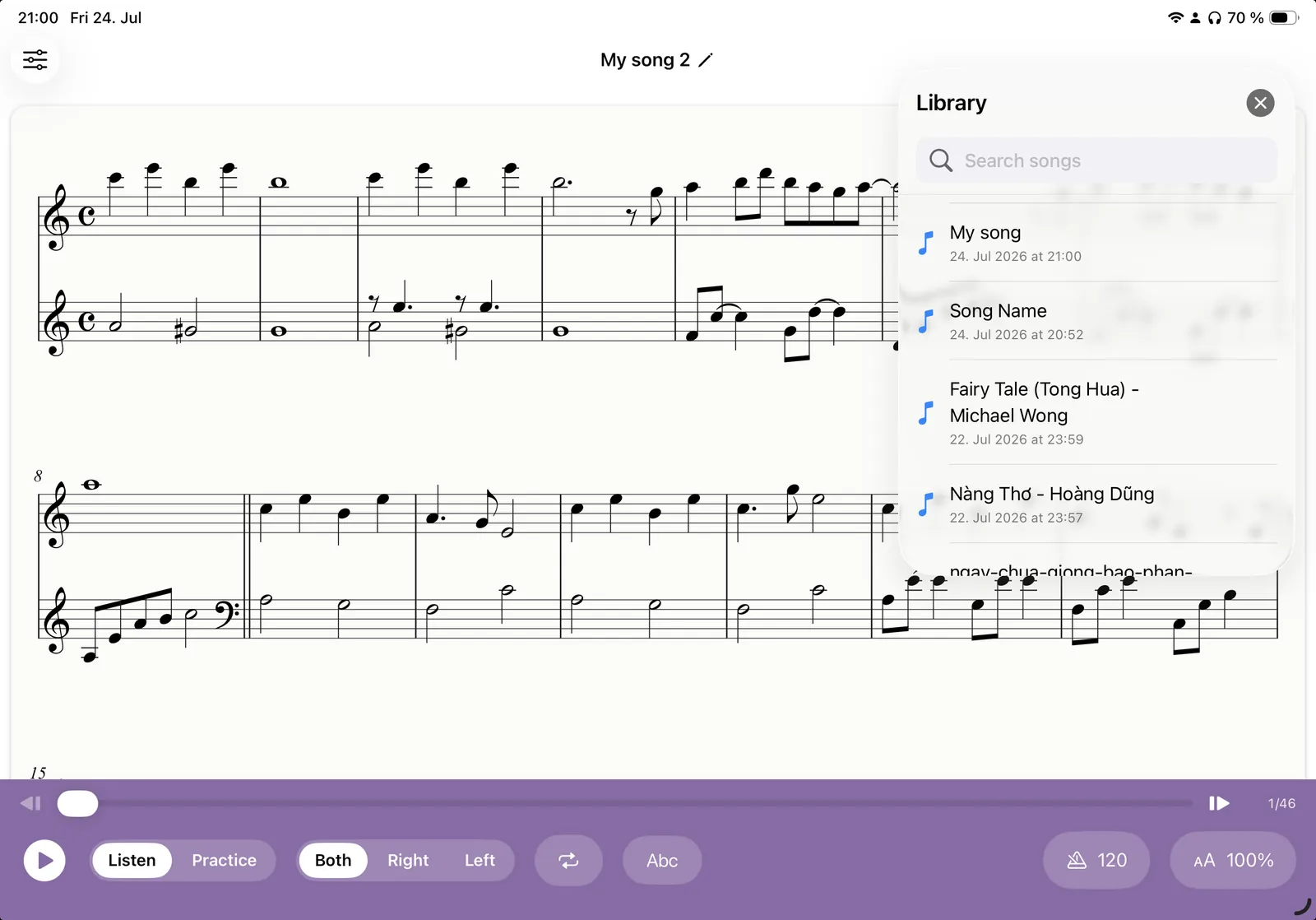
Everything after import runs offline, so a rehearsal room with no signal is not a problem.
What "play it" actually gives you
Hearing the piece is the first thing most people want, and it is genuinely the fastest way to learn how a phrase is meant to go. But playback on its own is just a recording. What makes an imported score useful is that the app knows the individual notes, so it can take the piece apart for you: mute a hand, halve the tempo, isolate four bars, put a name above every note head, or suggest which finger to use. None of that is possible with a PDF viewer, and none of it depends on the piece being in somebody's catalog.
There is also a built-in Finger Practice section (warm-ups, scales, arpeggios and finger-independence drills) for the days when you want to work on technique and have not got a score in front of you.
Where your own sheet music comes from
Most people already have more usable material than they think:
- PDFs you have bought. Digital sheet music retailers deliver PDFs; those are yours to practise from.
- Public-domain scores. Bach, Beethoven, Chopin, Satie, Scott Joplin and most of the standard repertoire are out of copyright, and libraries such as IMSLP hold clean editions.
- Your own scans. A flat, straight, 300 dpi scan of a printed edition you own converts well.
- MusicXML exports. Sibelius, Finale, Dorico, MuseScore and Notion all export MusicXML, the most accurate thing you can hand the app.
- Your own compositions. Export from your notation app and practise your own writing.
If you are starting from nothing, the public-domain route is worth an evening of your time. A short Bach prelude, a Satie Gymnopédie or a Clementi sonatina are free, well edited, and printed cleanly enough that recognition handles them easily, which also makes them a good way to see how well import works before you feed it something you paid for.
A word on copyright
Klavia is a personal practice tool. It does not sell, bundle or host sheet music, and it does not give you access to anyone else's library. What you import should be music you own, music in the public domain, or music you otherwise have permission to use. The same standard that applies to the photocopier at a music school.
In return, your library stays private. Imported pieces live on your device, not in a shared catalog, and nobody else sees what you are practising.
Questions
What file types can I import? ▾
Does the app have its own song library? ▾
Can it play back the piece so I can hear it? ▾
Does it work offline? ▾
Which devices are supported? ▾
Bring your own music
Download Klavia from the App Store and import the score you are working on this week.
Download on the App Store iPhone and iPad, iOS 16 or later. Android is planned after the iOS release.