 Klavia
A Synthesia alternative for your own sheet music.
People searching for a Synthesia alternative for their own sheet music are usually after one specific combination: the falling-notes view that makes a piece easy to start, but driven by the score they actually own rather than a MIDI file they have to hunt down.
Klavia imports PDFs and MusicXML, shows the result both as falling notes and as real engraved notation, and lets you switch between the two whenever you like.
How the two compare
Synthesia is a well-made piano-roll app built around MIDI files: notes fall onto a keyboard, you play along, and it tracks what you hit. It has been the reference for that style of learning for years, and if a MIDI file of your piece exists it does the job well.
Klavia starts from sheet music instead. The difference shows up mostly in what you feed it and what you get back.
| Piano-roll apps like Synthesia | Klavia | |
|---|---|---|
| What you import | MIDI files | PDF and MusicXML sheet music |
| Main view | Falling notes | Falling notes and engraved notation |
| Real notation | Secondary | Yes, properly engraved and re-flowed |
| Note names | On the falling blocks | On the notation itself, C-D-E or Do-Re-Mi |
| Fingering | From the file, if present | Suggested automatically, 1 to 5 |
| Platforms | Desktop and mobile | iPhone and iPad at launch; Android planned |
Neither is a replacement for the other in every respect. If your whole workflow lives in MIDI files, a piano-roll app is a natural fit. If your music arrives as sheet music, from a teacher, an exam board, a shop or IMSLP, starting from notation saves you a conversion step that often does not exist at all.
The falling-notes view
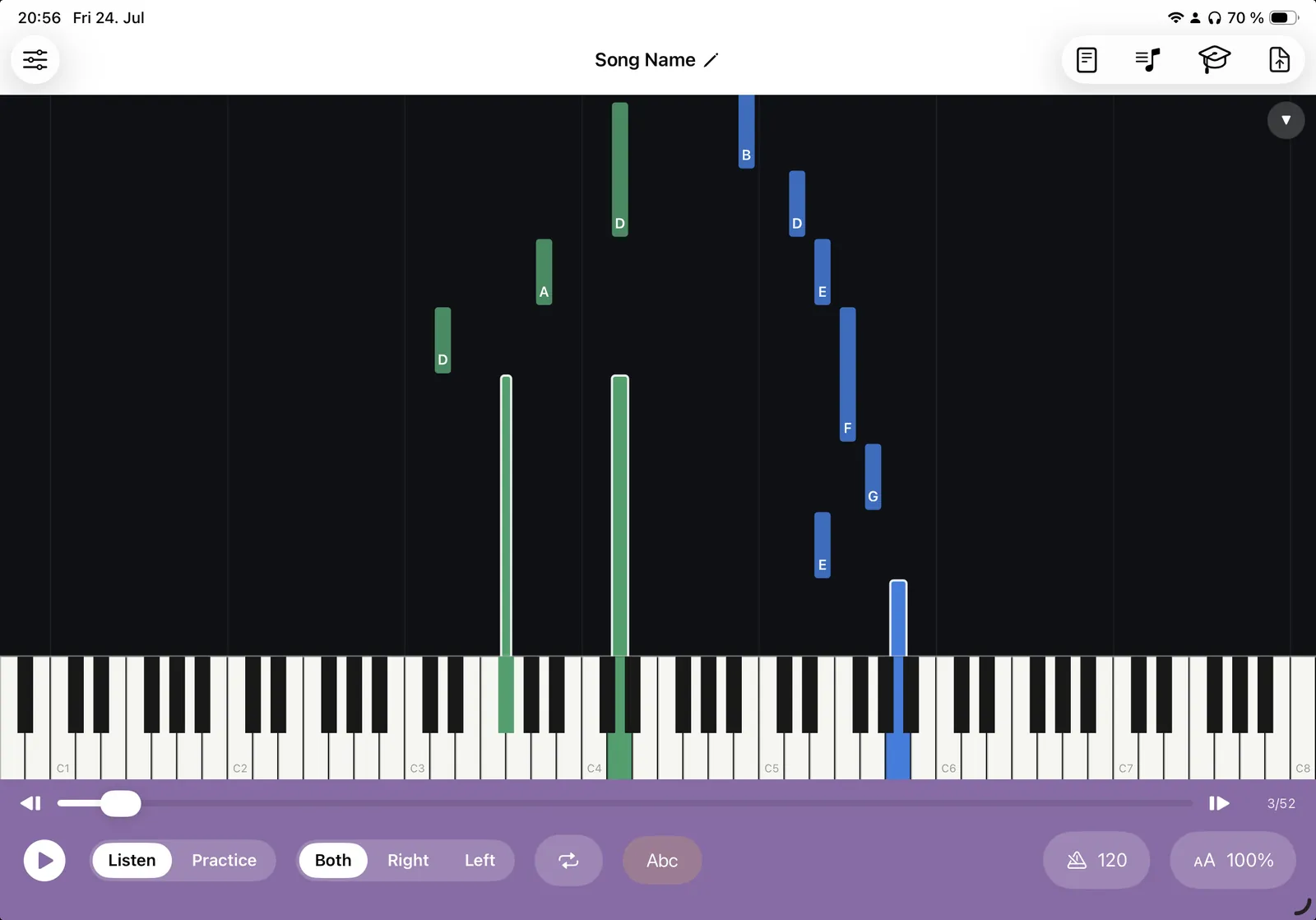
Klavia's falling-notes practice works the way you would expect: notes drop onto a full 88-key keyboard, sized and positioned so you can see exactly what to press and when, right hand and left hand distinguished by colour.
What is different is where the tempo comes from. Because Klavia read the score rather than a MIDI file, 100% means the piece's own marked tempo. So slowing to 60% is a musical decision rather than an arbitrary slider position.
And the notation view
The same piece is also a real score: engraved staves, beams, clefs and key signatures, laid out for your screen. From there you get the tools a piano roll cannot really offer:
- Note-name labels above the note heads, C-D-E or Do-Re-Mi, colour-coded by hand, off with one tap.
- Smart fingering, suggesting finger numbers 1 to 5 automatically.
- Hands separately, with the score re-engraved to a single staff.
- Bar loops and a tempo anchored to the score's own marking, with metronome and count-in.
- Wait mode, where the next note glows and the score waits for you to play it.
Why having both matters
Falling notes are excellent at one thing: getting you playing a piece quickly, without needing to read. That is genuinely valuable, and it is why the format is so popular.
The catch is well known. It does not teach you to read music. Learn twenty pieces from a piano roll and you can play twenty pieces; learn twenty pieces from notation and you can start the twenty-first on your own.
Having both views of the same file lets you use each for what it is good at. Start a new piece in falling notes to hear where it is going and get your hands in position. Switch to the notation, turn on note names, and play the same passage reading it. Turn the labels off. Over a few pieces the notation view stops feeling like the harder option. And by then you are reading.
Questions
Can Klavia import MIDI files like Synthesia? ▾
Does it have a falling-notes mode? ▾
Do I need a MIDI keyboard? ▾
Is it available on Windows or Android? ▾
Does it come with songs? ▾
Falling notes, from your own scores
Download Klavia from the App Store and see your own sheet music fall onto the keyboard.
Download on the App Store iPhone and iPad, iOS 16 or later. Android is planned after the iOS release.